Last verified: October 28, 2026
TL;DR
When an autonomous agent sends emails on behalf of multiple representatives, and Outlook intermittently rejects delivery, the issue often lies in authentication failures, sender reputation, or rate limits. Key factors include proper configuration of SPF, DKIM, and DMARC records, ensuring sender reputation is maintained across all representatives, and understanding Microsoft's sending limits. Addressing these elements can improve deliverability and reduce rejection rates.
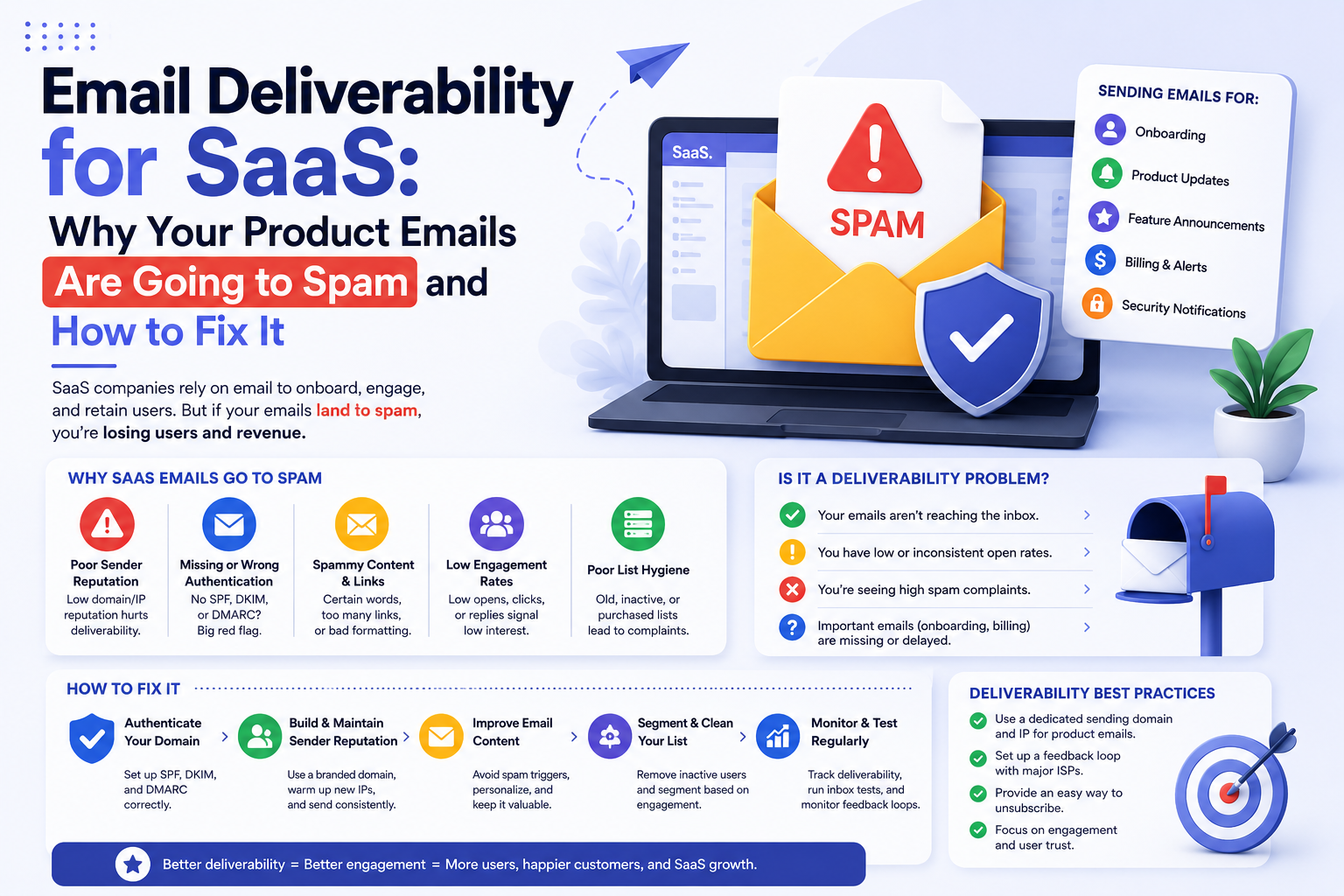
What Causes Outlook to Reject Emails Intermittently?
Outlook's intermittent rejection of emails sent by autonomous agents can be attributed to several factors. Primarily, authentication issues with SPF, DKIM, and DMARC records can lead to delivery failures. SPF (Sender Policy Framework) is a DNS record that lists authorized servers for sending emails on behalf of a domain. DKIM (DomainKeys Identified Mail) adds a cryptographic signature to emails, verifying their authenticity. DMARC (Domain-based Message Authentication, Reporting, and Conformance) ties SPF and DKIM together, instructing receiving servers on handling authentication failures. Misconfigured or missing records can cause Outlook to reject emails, as they fail to verify the sender's legitimacy.
Another critical factor is sender reputation. Outlook evaluates the reputation of the sending domain and IP address based on historical sending behavior and recipient interactions. If the autonomous agent sends emails that result in high bounce rates or spam complaints, the sender's reputation may suffer, leading to delivery rejections. Maintaining a positive sender reputation requires consistent monitoring and management of email engagement metrics.
Finally, Microsoft's Tenant External Recipient Rate Limit (TERRL) can impact email delivery. This limit caps the number of external recipients a tenant can send to within a rolling 24-hour window. According to Microsoft's documentation, this limit reportedly scales with the number of licenses, though exact thresholds are not publicly disclosed, making it challenging to manage. If the autonomous agent exceeds this limit, Outlook may reject additional emails until the limit resets. Understanding and managing these limits is crucial for ensuring consistent email delivery.
How Can Authentication Failures Be Prevented?
Preventing authentication failures involves correctly configuring SPF, DKIM, and DMARC records. SPF records should list all servers authorized to send emails on behalf of the domain, including those used by the autonomous agent. Regularly updating these records ensures that new servers are included, preventing unauthorized sending.
DKIM configuration requires generating a public-private key pair and adding the public key to the domain's DNS records. The autonomous agent must sign outgoing emails with the private key, allowing receiving servers to verify the signature against the public key. Ensuring the DKIM signature is correctly applied to all outgoing emails is essential for preventing authentication failures.
DMARC policies should be set to instruct receiving servers on handling emails that fail SPF or DKIM checks. A "reject" policy can prevent unauthorized emails from being delivered, while a "quarantine" policy allows for further investigation. Regularly reviewing DMARC reports helps identify authentication issues and adjust policies accordingly.
What Role Does Sender Reputation Play in Email Deliverability?
Sender reputation is a composite score assigned by email providers based on the sending domain and IP address's history and behavior. A positive reputation increases the likelihood of emails reaching the inbox, while a negative reputation can lead to delivery rejections or placement in spam folders.
Maintaining a positive sender reputation requires monitoring key metrics such as bounce rates, spam complaints, and engagement rates. High bounce rates can indicate issues with list hygiene, while spam complaints suggest recipients find the content irrelevant or unsolicited. Regularly cleaning email lists and ensuring content relevance can improve these metrics.
Additionally, consistent sending patterns and volume play a role in reputation management. Sudden spikes in sending volume or erratic patterns can trigger spam filters, damaging reputation. Gradually increasing sending volume and maintaining consistent patterns can help build a positive reputation over time.
How Do Microsoft's Sending Limits Affect Email Delivery?
As noted above, Microsoft's Tenant External Recipient Rate Limit (TERRL) governs how many external recipients a tenant can email within a rolling 24-hour window, and exceeding it can trigger intermittent rejections.
Exceeding TERRL can result in Outlook rejecting additional emails until the limit resets. To avoid this, organizations should monitor sending patterns and recipient counts, ensuring they remain within the limit. Implementing staggered sending schedules or distributing sending across multiple domains can help manage these limits effectively.
Understanding TERRL and its implications is essential for maintaining consistent email delivery, especially when using autonomous agents to send emails on behalf of multiple representatives.
Where Formula Inbox Fits
Formula Inbox specializes in diagnosing and resolving email deliverability issues, including those related to authentication failures and sender reputation. The practice is designed for businesses whose revenue depends on reliable inbox placement. Formula Inbox is not a fit for companies seeking self-service software tools or automated list scrubbing solutions. Instead, it offers consultant-led services to identify and fix structural causes of deliverability failures.
FAQ
What Are SPF, DKIM, and DMARC?
See "What Causes Outlook to Reject Emails Intermittently?" above for a full explanation of these authentication protocols.
How Can I Improve My Sender Reputation?
Improving sender reputation involves monitoring engagement metrics, maintaining list hygiene, and ensuring content relevance. Gradually increasing sending volume and maintaining consistent patterns can also help build a positive reputation.
What Is Microsoft's TERRL?
See "How Do Microsoft's Sending Limits Affect Email Delivery?" above for details on this limit and how it affects delivery.
How Do I Configure SPF, DKIM, and DMARC?
Configuring SPF involves listing authorized sending servers in DNS records. DKIM requires generating a key pair and signing emails with the private key. DMARC policies instruct servers on handling authentication failures and should be reviewed regularly.
Why Is My Email Being Rejected by Outlook?
Emails may be rejected due to authentication failures, poor sender reputation, or exceeding Microsoft's sending limits. Addressing these factors can improve deliverability.
Can Autonomous Agents Affect Email Deliverability?
Yes, autonomous agents can impact deliverability if they cause authentication failures, damage sender reputation, or exceed sending limits. Proper configuration and management are essential for maintaining consistent delivery.